Programming the NPU — ONNX Runtime, CoreML, DirectML, and Deploying to Apple ANE and XDNA 2
After writing the APU vs GPU vs NPU architecture deep dive, I kept getting the same question from readers: “Cool silicon, but how do I actually program the damn thing?”
Fair. Understanding that an NPU is a systolic array is one thing. Shipping a model that runs on it is another entirely.
The answer depends on which NPU you’re targeting. Each vendor ships their own compiler, their own quantization pipeline, and their own set of silently-unsupported ops. This post maps the landscape.
The Common Denominator: ONNX Runtime
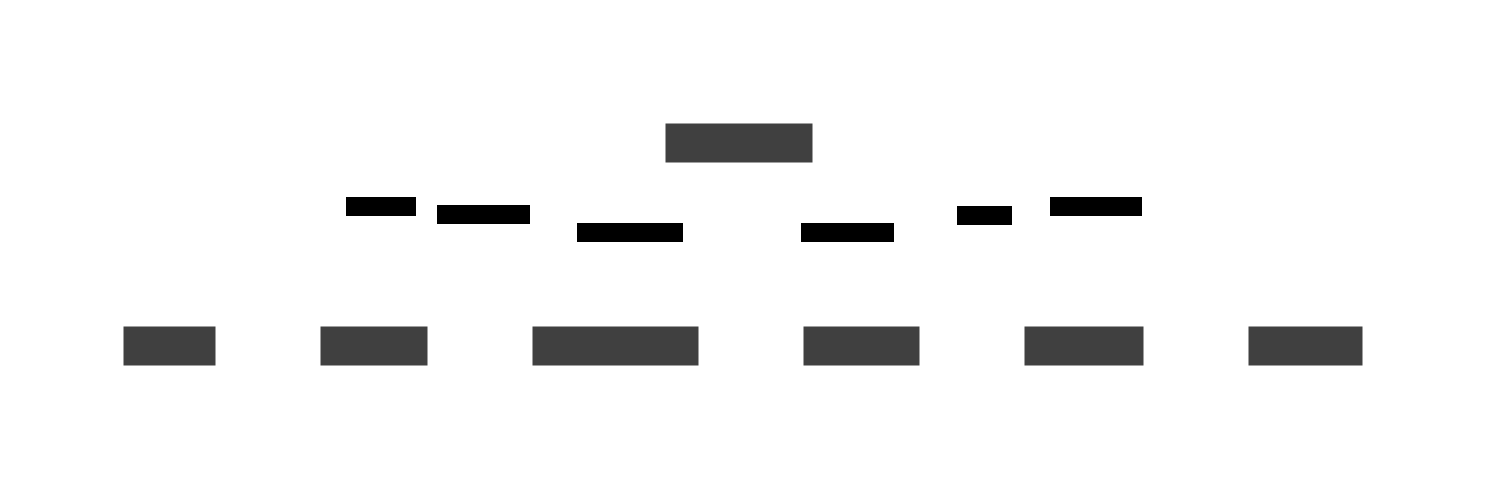
Every major NPU stack converges on ONNX Runtime (ORT) as the inference engine. You export your model to ONNX format, load it in ORT, and register the appropriate Execution Provider (EP) for your hardware.

The magic happens in that EP → NPU arrow. Each EP compiles the ONNX operator graph into hardware-specific microcode. This is where the complexity lives.
Here is a minimal ONNX Runtime session with an NPU execution provider:
import onnxruntime as ort

# List available EPs
print(ort.get_available_providers())
# ['CPUExecutionProvider', 'CoreMLExecutionProvider', ...]

# Create session with NPU EP
sess = ort.InferenceSession(
    "model.onnx",
    providers=['CoreMLExecutionProvider', 'CPUExecutionProvider']
)

# Run inference
outputs = sess.run(None, {"input": input_tensor})
The second provider (CPUExecutionProvider) is the
fallback. If the NPU EP can’t handle an operator, ORT silently falls
back to the CPU. This is the most common source of performance
surprises — your model says it’s running on the NPU, but half
the ops are actually on CPU.
Apple ANE: The Black Box
Apple’s Neural Engine is the most mature consumer NPU — it’s been shipping since the A11 in 2017 — but it’s also the most opaque. You don’t program the ANE directly. You feed it through CoreML and hope.
The CoreML Compiler Pipeline

The compiler is strict. Here is what silently gets your model rejected from the ANE:
| Constraint | Limit | Symptom |
|---|---|---|
| Precision | FP16 only (some INT8) | FP32 ops silently fall back to GPU |
| Tensor layout | [1, C, 1, S] (channels-first, padded) |
Compile error or data corruption |
| Channel count | Max ~8K channels per layer | 32K-dim vocabulary projection rejected |
| Activation functions | GELU must be approximated (tanh poly) | Compile rejection |
| Dynamic shapes | Not supported | Static shapes only at compile time |
concat nodes |
Limited support | Runtime fallback to CPU |
| Minimum buffer | ~49 KB per IOSurface | Single-token inference needs padding |
| Weights | Baked at compile time | Dynamic weights require recompilation |
How to Verify ANE Execution
The question every developer asks: “Is my model actually running on the ANE?”
The answer is not trivial. Here is the verification toolchain:
# 1. Xcode Performance tab (GUI)
# Import .mlpackage into Xcode → Performance → Generate Report
# Shows per-layer: ANE / GPU / CPU breakdown

# 2. CoreML environment logging
import os
os.environ["COREML_STATISTICS"] = "1"
# Dumps device placement per op during inference

# 3. ONNX Runtime CoreML EP
import onnxruntime as ort
sess = ort.InferenceSession(
    "model.onnx",
    providers=['CoreMLExecutionProvider'],
    provider_options=[{
        'MLComputeUnits': 'CPUAndNeuralEngine',
        'ModelFormat': 'MLProgram',
        'RequireStaticInputShapes': True,
    }]
)

# 4. Performance signature check
# ANE: ~38 TOPS, extremely low idle power, massive perf drop if SRAM overflows
# GPU: Higher latency, higher power, handles unsupported ops
# CPU: Highest latency, no constraint issues
Key insight: MLX does not target the ANE. MLX is
Apple’s open-source ML framework — NumPy-like Python API, unified
memory, excellent for training and fine-tuning — but it runs exclusively
on Metal (GPU). If you want ANE inference, you convert to CoreML via
coremltools. The workflow is: train/fine-tune with
MLX → export to CoreML → deploy to ANE.
Real-World Example: Deploying a Transformer to ANE
import coremltools as ct
import torch

# 1. Trace your PyTorch model
model = MyTransformerModel().eval()
traced = torch.jit.trace(model, example_input)

# 2. Convert to CoreML (MIL)
mlmodel = ct.convert(
    traced,
    inputs=[ct.TensorType(shape=(1, 512), name="input_ids")],
    minimum_deployment_target=ct.target.iOS18,
    compute_units=ct.ComputeUnit.CPU_AND_NEURAL_ENGINE
)

# 3. Inspect what ran where
mlmodel.save("transformer.mlpackage")

# Open in Xcode → Performance tab → check ANE %
# If < 80% ANE: find the fallback ops and refactor
AMD XDNA 2: The Spatial Array
AMD’s approach is fundamentally different from Apple’s. Where Apple hides the ANE behind CoreML’s opaque compiler, AMD exposes the XDNA 2 NPU through ONNX Runtime with the Vitis AI execution provider — and the compilation step is brutally honest about what it can and cannot run.
The XDNA 2 Architecture
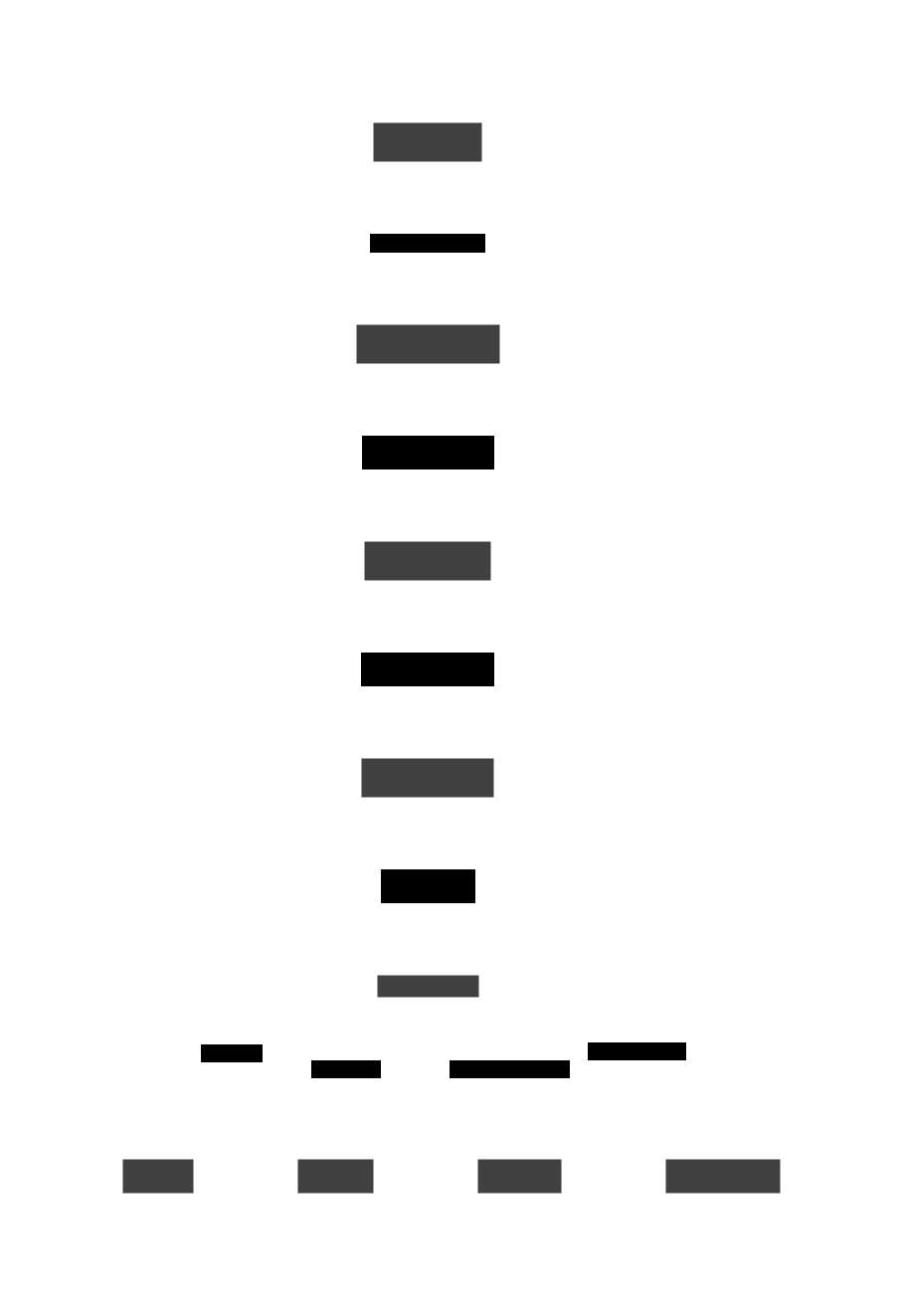
Each AI Engine tile contains a VLIW SIMD vector processor, a scalar RISC processor for control flow, local SRAM scratchpad, and DMA engines for inter-tile communication. Data flows spatially between adjacent tiles without hitting external DRAM. This is the key architectural difference from Apple’s ANE — XDNA 2’s dataflow is programmable, not fixed-function.
The Quantization Requirement
The XDNA 2 NPU runs INT8 operations natively. You must quantize your model before deployment:
# AMD Quark quantization pipeline
from quark.onnx import ModelQuantizer, QuantizationConfig

config = QuantizationConfig(
    quant_format=QuantFormat.QDQ,  # Quantize-Dequantize
    activation_type=QuantType.QInt8,
    weight_type=QuantType.QInt8,
    calibrate_method=CalibrationMethod.MinMax,
)

quantizer = ModelQuantizer(config)
quantizer.calibrate(model, calibration_data_loader)
quantized_model = quantizer.quantize(model)

# Export quantized ONNX
quantizer.save(quantized_model, "model_quantized.onnx")
AMD recently shipped AMD Quark as the unified quantization toolkit (replacing the older Vitis AI Quantizer). It supports PyTorch and ONNX models, calibrates activations against a representative dataset, and emits QDQ-format ONNX graphs.
The Compilation Tax
This is where XDNA 2 differs most from Apple ANE. First-time session
initialization compiles the ONNX graph into an .xclbin
binary — and this can take minutes.
import onnxruntime as ort

# First run: compilation happens here
# Can take 30-120 seconds depending on model size
sess = ort.InferenceSession(
    "model_quantized.onnx",
    providers=['VitisAIExecutionProvider'],
    provider_options=[{
        'cache_dir': './xclbin_cache',   # Cache compiled binaries
        'cache_key': 'model_v1',          # Cache key for invalidation
    }]
)

# Subsequent runs: loads cached .xclbin (~instant)
outputs = sess.run(None, {"input": input_tensor})
The cache_dir parameter is essential. Without it, every
process restart triggers a full recompilation. With caching, subsequent
runs load the compiled binary in under a second.
XDNA 2 vs Apple ANE: Practical Comparison
| Dimension | Apple ANE (M4) | AMD XDNA 2 (Strix Point) |
|---|---|---|
| Peak throughput | ~38 TOPS (FP16) | ~50-60 TOPS (INT8) |
| Programming model | CoreML (black box) | ONNX Runtime + Vitis AI EP |
| Quantization | Automatic (FP16 internal) | Manual (AMD Quark → INT8) |
| Compilation time | Seconds | 30-120 seconds (first run) |
| Operator support | Curated (common ops only) | Standard ONNX opset |
| Linux support | N/A (macOS only) | Growing (primary: Windows) |
| LLM inference | Limited by channel count | Better for large matmuls |
| Debugging tools | Xcode Performance tab (GUI) | ONNX Runtime logging, Vitis Analyzer |
| Weights update | Recompile required | Recompile required (cached) |
Microsoft DirectML: The Windows NPU Abstraction
Microsoft’s approach is different again. Instead of a vendor-specific EP, DirectML sits as a hardware-agnostic DirectX 12 compute layer that targets NPUs alongside GPUs.
The Windows AI Stack
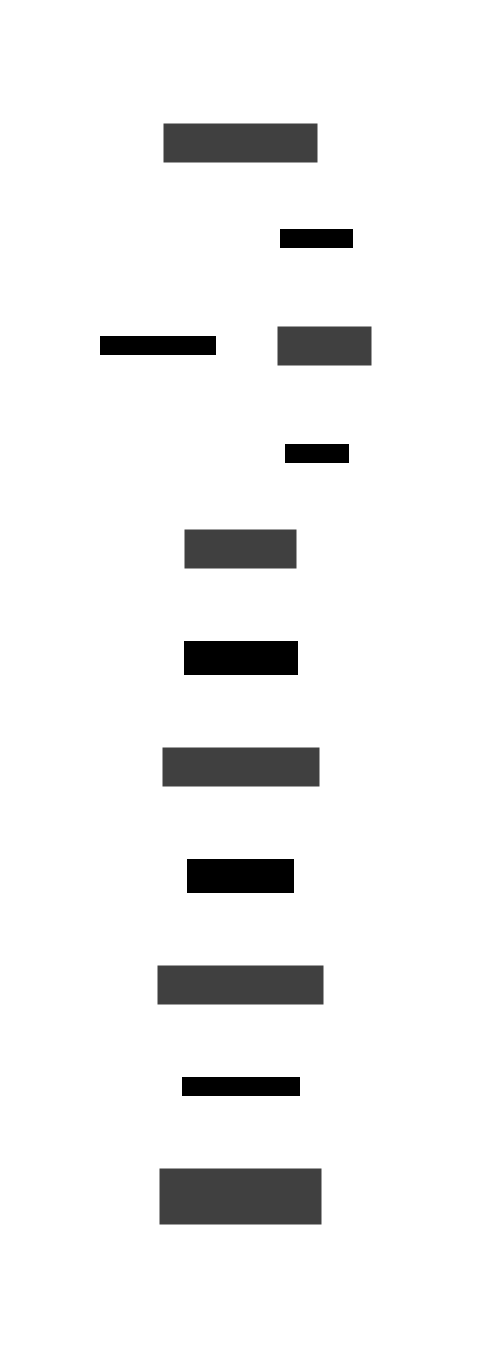
The key innovation in Windows 11 24H2+ is the Windows Copilot Runtime. Instead of you manually bundling NPU-specific EPs into your app package, Windows ML dynamically discovers the hardware, fetches the appropriate EP via Windows Update, and routes execution transparently.
# Windows: DirectML EP with ONNX Runtime
import onnxruntime as ort

sess = ort.InferenceSession(
    "model.onnx",
    providers=['DmlExecutionProvider', 'CPUExecutionProvider'],
    sess_options=ort.SessionOptions()
)

# Key constraint: DirectML EP requires these settings
sess.options.enable_mem_pattern = False
sess.options.execution_mode = ort.ExecutionMode.ORT_SEQUENTIAL
DirectML Constraints
| Constraint | Details |
|---|---|
| Memory patterns | enable_mem_pattern = False (DML manages its own D3D12
resources) |
| Execution mode | Sequential only (ORT_SEQUENTIAL) — no parallel graph
execution |
| Multi-threading | Cannot call Run() on same session from multiple
threads |
| OPSET support | Tracks up to OPSET 20; some specialized ops (GridSample, DeformConv) unsupported |
| Precision | FP32/FP16 depending on driver and hardware |
The Dynamic EP Discovery Model (Windows 11 24H2+)
In newer Windows builds, you don’t even need to specify the EP:
# Windows 11 24H2+: EP auto-discovery
# WinML queries hardware → finds best EP → downloads via Windows Update
# No need to bundle vendor-specific DLLs in your app package

import winml  # Windows ML Python bindings

model = winml.Model.Load("model.onnx")
# Runtime automatically selects: QNN EP (Snapdragon) /
# OpenVINO EP (Intel) / Vitis AI EP (AMD) / DML EP (fallback)
results = model.Evaluate(input_binding)
This is the most developer-friendly approach on any platform — but it’s Windows-only and requires Windows 11 24H2 or later.
The ONNX Opset Support Matrix
Here is the uncomfortable truth about NPU programming: every EP supports a different subset of ONNX operators. If your model uses an op that your target EP doesn’t support, it silently falls back to CPU.
| Operator | CoreML EP | Vitis AI EP | QNN EP | OpenVINO EP | DirectML EP |
|---|---|---|---|---|---|
| Conv2D | ✅ | ✅ | ✅ | ✅ | ✅ |
| MatMul | ✅ | ✅ | ✅ | ✅ | ✅ |
| LayerNorm | ✅ | ✅ | ✅ | ✅ | ✅ |
| Softmax | ✅ | ✅ | ✅ | ✅ | ✅ |
| GELU | ⚠️ (approx) | ✅ | ✅ | ✅ | ✅ |
| SiLU/Swish | ❌ | ✅ | ✅ | ✅ | ✅ |
| Attention | ⚠️ (fused only) | ⚠️ (select patterns) | ✅ | ✅ | ⚠️ |
| Reshape (dynamic) | ❌ | ❌ | ❌ | ✅ | ⚠️ |
| Concat | ⚠️ (limited) | ✅ | ✅ | ✅ | ✅ |
| Where | ❌ | ⚠️ | ❌ | ✅ | ✅ |
| Loop/If | ❌ | ❌ | ❌ | ⚠️ | ✅ |
| GridSample | ❌ | ❌ | ❌ | ✅ | ❌ |
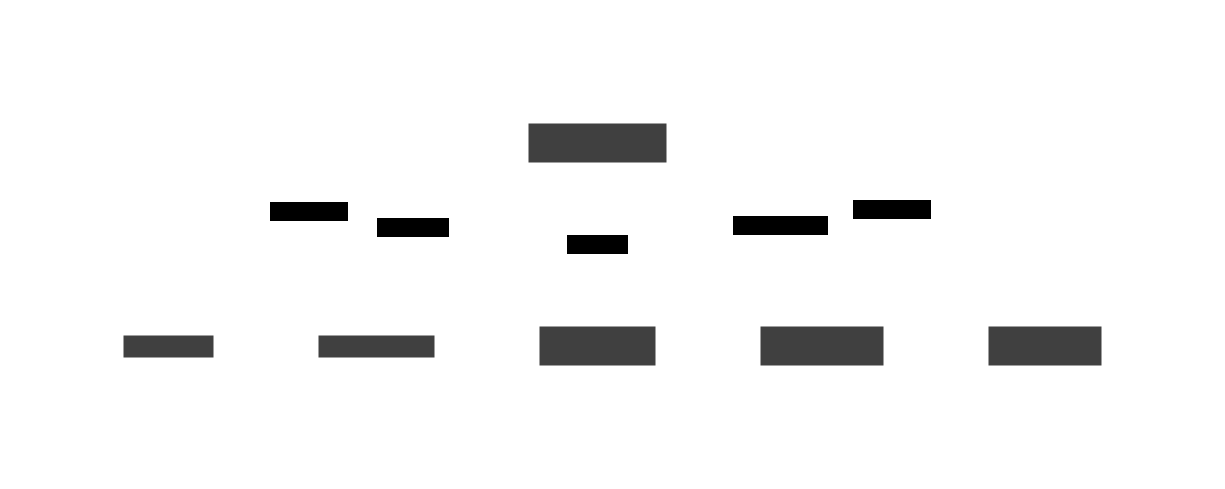
The practical consequence: you design your model architecture around what your target EP supports, not around what’s mathematically optimal. This is the opposite of how ML research works.
The Practical Decision Matrix
Which stack should you use? Here is my honest assessment:
| Target | Stack | Quantization | Compilation | Best For |
|---|---|---|---|---|
| Apple devices | PyTorch → coremltools → CoreML |
Automatic (FP16) | Seconds | Mobile apps, macOS desktop |
| AMD laptops | PyTorch → ONNX → Quark (INT8) → Vitis AI EP | Manual | 30-120s | Windows AI PCs, edge inference |
| Qualcomm SoCs | PyTorch → ONNX → QNN EP (QDQ format) | Strictly required | Moderate | Snapdragon X laptops, Android |
| Intel Ultra | PyTorch → ONNX → OpenVINO EP | FP16/QDQ | Low | Windows/Linux laptops |
| Cross-platform | PyTorch → ONNX → DirectML EP | FP32/FP16 | Low | Windows desktop (any NPU) |
| Web apps | ONNX Runtime Web → WebNN EP | Browser-dependent | Low | Browser-based inference |
| Research/training | MLX (Apple), PyTorch (all) | N/A (GPU only) | N/A | Training, fine-tuning, experimentation |
The Future: Where NPU Programming Is Heading
Three trends are worth watching:
1. WebNN. The W3C Web Neural Network API exposes NPU acceleration to browsers. ONNX Runtime Web already ships a WebNN EP. In 2026, Chromium-based browsers on Windows with NPU hardware can route inference through WebNN → DirectML → NPU, entirely within the browser sandbox. This makes NPU acceleration available to any web app without native SDKs.
2. Unified ONNX EP Discovery. Windows 11 24H2’s
dynamic EP model is the template for where the industry is heading.
Instead of developers hardcoding EP selection, the runtime queries
available hardware, downloads the right compiler, and routes ops
automatically. ONNX Runtime’s get_available_providers()
plus session options like provider_options with automatic
fallback chaining is the portable approximation.
3. LLM-Native NPUs. Every vendor is racing to make their NPU handle transformer inference efficiently. Apple’s ANE struggles with large channel counts (vocabulary projections still hit the GPU). AMD’s XDNA 2 handles larger matmuls but requires INT8 quantization. Qualcomm’s Hexagon NPU6 at 85 TOPS is currently the most transformer-friendly. But none of them run a 7B-parameter model end-to-end on the NPU alone — there is always CPU/GPU fallback for embedding lookups, KV-cache management, and token sampling.
The Bottom Line
Programming an NPU in 2026 means picking your platform, accepting your quantization tax, and designing your model architecture around operator support matrices rather than mathematical optimality. The ONNX Runtime EP model is the closest thing to a universal API, but each EP is a different compiler with a different set of silently-unsupported ops.
If you are building for Apple: CoreML. For AMD Windows: Vitis AI EP + Quark. For Windows generally: DirectML or WinML auto-discovery. For the web: WebNN. For research: stay on GPU.
And always, always verify your model is actually running on the NPU — not silently falling back to CPU while you wonder why your inference latency hasn’t improved.