GitHub MCP vs gh CLI vs Built-in Remote: Non-Human Identity, AuthN/AuthZ, and Token Anatomy
When you connect an AI coding environment to GitHub, you often see three different things that all look like "GitHub access": a Built-in Remote Connector, the gh CLI, and a GitHub MCP Server. On the surface they all touch your repositories. Under the hood, they represent three completely different identity boundaries, token lifecycles, and Non-Human Identity (NHI) risk profiles.
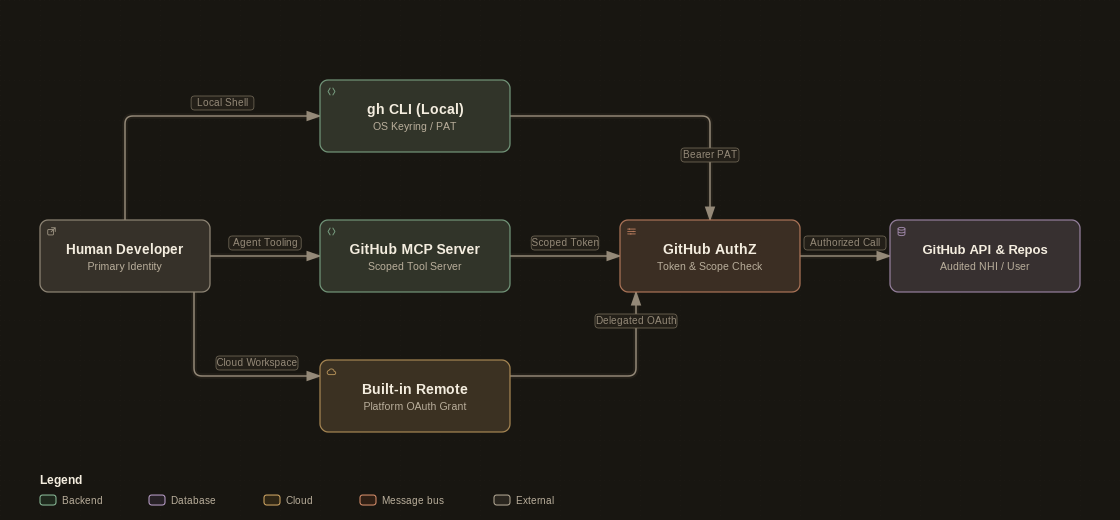
1. The Three Surfaces: Identity, AuthN, and AuthZ
- Built-in Remote Connector: Managed by the cloud/IDE platform itself. You complete an OAuth consent flow once, and the platform holds a delegated refresh/access token to clone repositories into remote workspaces. Your local agent cannot call arbitrary GitHub APIs through it.
ghCLI: A local binary running in your shell. It authenticates via an interactive device flow or Personal Access Token (PAT) stored in your OS keyring (or~/.config/gh/hosts.yml). Any process—including an agent with shell access—inherits your full local user permissions.- GitHub MCP Server: A structured Model Context Protocol server exposing explicit, schema-validated tools (e.g.,
create_pull_request,list_issues). It runs with its own scoped token, decoupling the agent's tool surface from your raw shell environment.
2. Authorization Mechanics: AuthN vs AuthZ & NHI
Authentication (AuthN) proves who is making the request (human user vs. workload/agent). Authorization (AuthZ) decides what that identity is allowed to do on a specific resource. In agentic workflows, the agent acts as a Non-Human Identity (NHI)—either impersonating you (delegated OAuth/PAT) or acting as its own service principal (GitHub App installation token).
The core danger of conflating these surfaces is over-privileged delegation: giving an autonomous agent a classic gh CLI PAT with repo + admin:org scopes means a prompt injection or stray command has the exact same blast radius as you.
3. OAuth 2.1 & OIDC Federation Flows
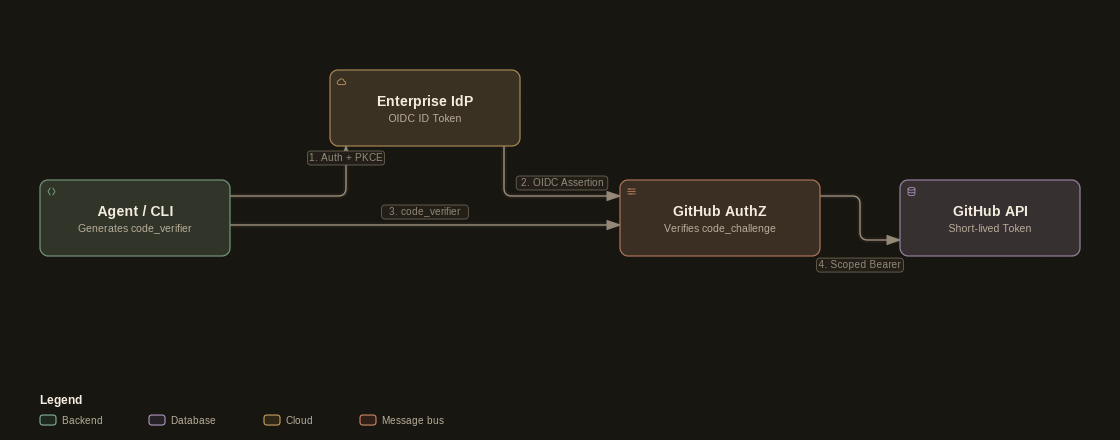
Modern authorization replaces static, long-lived secrets with OAuth 2.1 (with mandatory PKCE) and OIDC Federation. Instead of storing a static PAT on disk, the client generates an ephemeral code_verifier, proves its identity to an Enterprise IdP via an OIDC ID Token, and exchanges the authorization code for a short-lived, narrowly scoped access token.
4. Enterprise Federation & Lifecycle Glue
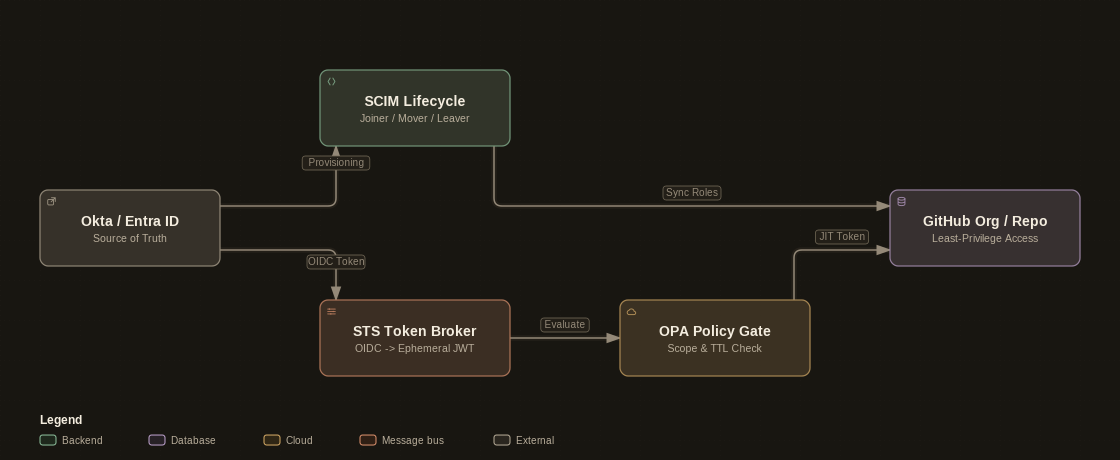
In an enterprise environment, authentication is only half the story. Enterprise Federation & Lifecycle Glue connects your Identity Provider (Okta, Microsoft Entra ID) to GitHub via SCIM (for Joiner/Mover/Leaver provisioning) and an STS / Policy Gate (OPA) that issues Just-In-Time (JIT) ephemeral tokens. When a developer leaves or an agent task ends, access is revoked automatically without hunting down orphaned PATs.
5. Cryptographic Authentication & Token Anatomy
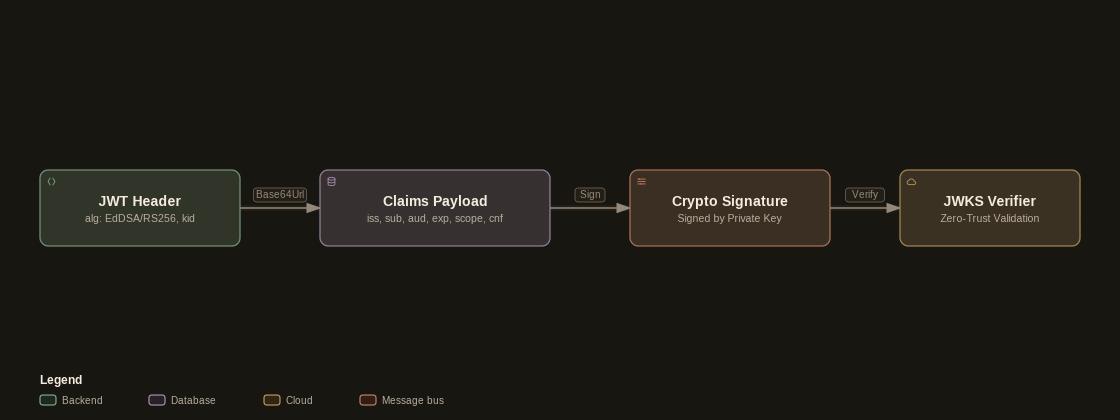
Whether a token is an opaque GitHub PAT (ghp_... / github_pat_...) or a federated JWT, understanding its anatomy is essential for zero-trust verification:
- Header: Declares the signing algorithm (
EdDSAorRS256) and Key ID (kid) for JWKS lookup. - Claims Payload: Encodes
iss(issuer),sub(subject/NHI),aud(intended audience),exp(short TTL),scope(least-privilege permissions), and optionallycnf(proof-of-possession key binding). - Cryptographic Signature: Ensures tamper-evidence—any resource server can verify the token offline against the issuer's public JWKS without trusting the caller.
Summary
Use the Built-in Remote Connector for platform-managed repo cloning, gh CLI for interactive human terminal workflows, and a scoped GitHub MCP Server (backed by short-lived OAuth/App tokens) when giving AI agents structured, least-privilege access to your repositories.